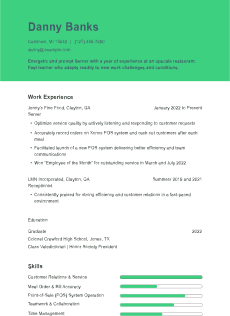
Your resume template does more than organize information; it instantly shapes hiring managers’ perception of you. Choosing the right resume template is a strategic decision with dozens of formats available. A clean, well-organized layout can help your achievements shine, while the wrong design could get you filtered out by Applicant Tracking Systems (ATS) before a human even sees your application.
In this guide, we’ll break down the most common types of resume templates by format, style, and use case — including which templates are best for different career stages and job industries.
The Three Main Resume Formats
When people refer to “types of resumes,” they usually talk about one of three formats: chronological, functional, or combination. These formats affect how your work experience and skills are prioritized.
Chronological Resume Template
This is the most widely used and employer-preferred format. A chronological resume lists your work history in reverse order, with your most recent job at the top. It focuses on job titles, dates of employment, and professional growth.
Best for:
Applicants with steady career progression
Candidates applying to traditional industries like finance, education, or health care
Avoid if you:
Have significant gaps in employment
Are changing industries with little relevant experience
Functional Resume Template
A functional resume shifts the focus away from job titles and timelines. Instead, it groups your experience by skills or areas of expertise. While this format can help highlight your strengths, it may raise red flags with employers if the timeline isn’t clear.
Best for:
Career changers
People returning to the workforce
Applicants with limited professional experience but strong transferable skills
Avoid if:
You have a consistent and relevant work history — chronological or hybrid may serve you better
Combination (Hybrid) Resume Template
The combination resume merges both approaches. It begins with a summary of strong skills or qualifications and then transitions into a chronological listing of work history. This format provides context and flexibility, allowing you to guide the narrative while still showing employment progression.
Best for:
Experienced professionals with specialized skill sets
Leaders and project managers
Applicants targeting specific roles that require both technical and managerial expertise
Visual Resume Template Styles
Beyond format, the visual layout of your resume also matters. Here are the most common style categories and when to use them:
Minimalist Resume Templates
A minimalist template features clean lines, consistent spacing, and neutral fonts. Rather than clutter, this template has clear information that’s easy to scan quickly.
Best for:
Job seekers in conservative or traditional industries
First-time applicants or recent graduates
Anyone applying through online portals that use ATS
Modern Resume Templates
Modern templates introduce subtle design elements — like muted colors, section icons, or custom headings — while maintaining readability. They strike a balance between creativity and professionalism.
Best for:
Roles in marketing, tech, or startups
Candidates who want to show personality while staying professional
Professionals who want to modernize their layout without sacrificing clarity
Creative Resume Templates
These templates feature bold colors, infographic elements, or unconventional layouts. While they can be visually engaging, they often aren’t ATS-friendly.
Best for:
Graphic designers, creative freelancers, or digital artists
Networking events, portfolio drops, or personal websites
When the resume is likely to be reviewed by a human, not a system
Avoid if:
You’re applying to corporate roles or large companies with ATS systems
The job posting asks for a plain-text or PDF resume only
Professional Resume Templates
These templates use standard fonts (like Calibri or Times New Roman), classic section headings, and a formal tone. They prioritize structure and professionalism over creativity.
Best for:
Executive roles
Legal, finance, and administrative positions
Mid- and late-career professionals with 10+ years of experience
Matching Resume Types to Career Goals
Choosing a resume template isn’t just about personal style; it should align with your experience level and job search goals.
Entry-Level or Student Resumes
If you’re a recent graduate or just starting your career, opt for a minimalist template in a chronological or functional format. Since you may have limited work experience, emphasize your education, internships, volunteer work, or coursework.
Tip !
Start with a summary or objective that shows your enthusiasm
Highlight skills acquired through leadership positions, part-time jobs, volunteer work, school projects, or extracurriculars
Resume Types for Career Changers
Switching industries? Use a functional or hybrid format to focus on transferable skills. Rather than emphasizing past job titles, show how your abilities align with the new field.
Tip !
Add a skills summary section at the top that highlights transferable skills and lets the reader know the type of position you’re seeking.
Include relevant certifications, courses, or projects from your new field
Resume Templates for Experienced Professionals
Mid- to senior-level professionals benefit most from hybrid or chronological templates. Show career advancement, leadership, and measurable achievements.
Tip !
Lead with a qualifications summary
Use bullet points with metrics to emphasize impact (e.g., “increased sales by 30%”)
Choosing a Template for Applicant Tracking Systems Compliance
ATS can reject resumes that use overly complex formatting or graphics or translate your information incorrectly due to creative formatting. To improve your chances of getting past automated filters:
Use standard section headings (like “Experience” instead of “What I’ve Done”)
Avoid columns, text boxes, images, and tables
Save your file as a .docx or plain PDF — no custom fonts or unusual file types
Stick with left-aligned text and avoid dense formatting
Look for templates specifically labeled ATS-friendly if applying through job boards or company portals.
Tips for Customizing Any Resume Template
Choosing the right template is just the first step — customizing it properly makes the real difference.
Tailor the content to match each job description, even if you keep the same layout
Use keywords from the posting naturally within your summary, skills, and experience
Avoid filler words or vague phrases; be clear about what you’ve done and the results
Keep sections consistent — use the same font sizes, bullet formatting, and spacing throughout
Double-check formatting on multiple devices before submitting
Download All Types of Resume Templates Resume Templates
Free Download: Types of Resume Templates Resume Examples in PDF & Word
Get these resumes as a free download in PDF or Word formats—perfect for customizing or sharing.
Sorry! We ran into an issue. Please try a different file.
Frequently Asked Questions
Which type of resume template is best for online applications?
Chronological or hybrid templates with ATS-friendly formatting work best. Avoid using tables, graphics, or columns, as they confuse resume-scanning software.
Can I use a creative resume template for any job?
Creative templates are appropriate for roles in design, media, or visual arts. However, they're not ideal for corporate applications or automated systems. Stick to traditional or modern layouts unless your industry rewards visual flair.
How do I know which resume format fits my situation?
If you have steady work experience in your target field, use a chronological format. And if you're changing careers or have gaps in your history, consider a functional or hybrid format to highlight transferable skills.
Should I use different resume templates for different job applications?
Yes and no. If you're applying across different industries or types of roles you might want a different format or to highlight different experiences, but you don't need a different resume for every application. A resume tailored in content and layout shows you've tried to fit the employer's expectations.
Do hiring managers care about resume templates or just the content?
Both matter. A well-structured template makes it easier for a hiring manager to read your qualifications quickly. Poor formatting can distract from good content or even get your resume discarded if it doesn't pass the ATS screening.
Final Thoughts
The right resume template makes a strong first impression and helps your experience stand out. Whether you’re a new graduate, changing industries, or applying for a leadership position, you can find a format and style that fits your needs.
Before choosing, consider the role, the company culture, and how your background fits into the picture. A strong layout won’t get you the job on its own, but it can help you get one step closer to the interview.
Written by professional resume writers and loved by hiring managers
Resume Templates offers free, HR approved resume templates to help you create a professional resume in minutes. Choose from several template options and even pre-populate a resume from your profile.