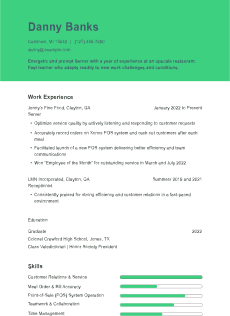
If you’re looking for a free, easy way to start building your resume, Google Docs is a solid place to begin. Many people don’t realize that Google Docs offers a selection of pre-designed resume templates built right into its platform. These templates are simple, effective, and accessible to anyone with a Google account.
In this guide, we’ll show you where to find these templates, how to use them, and whether they fit your career needs. We’ll also review the pros and cons and explain how they compare to other resume-building tools.
Google Docs Offers Built-In Resume Templates
Google Docs comes with several resume templates that you can use and edit for free. They’re stored in the Template Gallery and include layouts for different industries and design preferences. Whether you’re a student, a creative professional, or someone applying to a corporate role, you can find a basic template that fits.
These templates are already formatted, so you don’t need to worry about adjusting margins, spacing, or font hierarchy — you can just fill in your information and customize as needed.
Click the “Template Gallery” in the upper-right corner of the page.
Scroll down to the “Resumes” section.
Click on any template to open and begin editing.
Popular options include:
Swiss
Coral
Spearmint
Serif
You can also search for “Google Docs resume templates” directly in your browser to access the gallery.
What you need to use the templates
A Google account (free to sign up)
Internet access for initial use (you can enable offline mode later)
Desktop browser access for the best editing experience — mobile access is limited and harder to format
Overview of the Google Docs Resume Templates
Each of the built-in templates has its own design style. Here’s what you can expect from each:
Swiss
This clean, modern template prioritizes readability and white space. It includes bold section headers and a balanced layout, making it one of the most ATS-friendly options.
Best for: Most job seekers, especially those in professional or corporate roles.
Coral
Coral adds a slight creative flair with muted color in the headers. It maintains a simple structure, but the visual touch makes it more modern.
Best for: Applicants in marketing, communications, or startups who want more personality.
Spearmint
Spearmint uses a one-column layout with basic sectioning. It’s minimalist and easy to scan quickly, which works well for early-career resumes.
Best for: Students and recent grads.
Serif
Serif has a more traditional design with classic fonts and straightforward formatting. It avoids flash in favor of professionalism.
Best for: Applicants in legal, administrative, or government roles.
Pros and Cons of Google Docs Resume Templates
Pros
Free and accessible: You don’t need to install software or pay anything to use the templates.
Easy to edit: Templates open in your browser and save automatically to your Google Drive.
Simple sharing: You can send resumes as links or download them as PDFs.
Compatible with most devices: Use across Windows, macOS, or Chromebook platforms.
Cons
Limited variety: Only a handful of templates are available by default.
Basic customization: You can change fonts or add sections, but it’s not as flexible as Canva or Word.
Not all are ATS-friendly: Some templates use design elements that could confuse applicant tracking systems (ATS) such as boxes or multiple columns.
Why Applicant Tracking System-Friendliness Still Matters — Even With Google Docs
Many employers use ATS to scan resumes before a human ever sees them. While Google Docs templates aren’t inherently ATS-proof or ATS-unfriendly, how you customize them makes the difference.
Avoid these formatting pitfalls:
Using tables or multi-column layouts.
Inserting images or icons into the text area.
Utilizing stylized fonts that may not render correctly.
Stick to standard headers like “Work Experience” or “Skills,” and use bullet points rather than paragraphs for job duties. These choices help ensure your resume is machine-readable and doesn’t get rejected before review.
If you’re unsure whether your final resume will pass through an ATS, save it as a PDF and run it through a free ATS checker online. This simple step can catch small formatting issues before they cost you an interview.
Are Google Docs Resume Templates Right for You?
Google Docs templates are ideal for people who need a fast, no-frills solution — but they aren’t for everyone. Here’s when they work best and when you might want to explore other options.
Best Use Cases
You’re applying for an entry-level or mid-level role.
You want a clean layout with minimal design.
You need something editable and shareable on the go.
You’re creating your first resume and want to follow a standard structure.
When to look elsewhere
You’re applying for jobs in highly competitive or design-driven fields.
You seek a custom layout or infographic-style design.
You need guaranteed ATS optimization and more control over sections.
How To Customize a Google Docs Resume Template
Customizing your resume goes beyond plugging in your name and job titles. Your edits should reflect your experience, strengths, and job posting requirements. Google Docs templates are designed to be flexible enough to support these adjustments, but the effort is up to you.
Here are additional tips to fully personalize your resume:
Write a compelling summary: Start with a brief paragraph highlighting your top qualifications. This could include your job title, years of experience, industries you’ve worked in, and one or two key strengths. Keep it concise — three to five lines at most.
Reorder sections if needed: Many templates place education or experience first by default. Depending on your background, you might move your skills or certifications higher up. You can easily cut and paste sections into a different order in Google Docs.
Use consistent formatting: Pay attention to line spacing, font size, and indentation. If you add a new bullet or section, match it to the format used elsewhere on the page. This ensures your resume looks professional and clean.
Make sure to run a spelling and grammar check before submitting. Google Docs includes a built-in tool, but you can also use browser extensions like Grammarly for extra polish.
Alternatives to Google Docs Resume Templates
If you find the built-in options too limited, there are many other resume tools worth exploring:
ResumeTemplates.com: Offers downloadable Google Docs resume templates with more variety and better formatting.
Microsoft Word: Includes a larger selection of templates and more control over design.
Canva: Great for creative and visual resumes.
Zety, ResumeGenius, or other resume builders: Offer drag-and-drop interfaces and guided content suggestions.
If you’re looking for something that blends flexibility, polish, and compatibility with ATS systems, tools like ResumeTemplates.com offer a helpful middle ground between Google Docs and full design software.
Download All Does Google Docs Have Resume Templates? Resume Templates
Free Download: Does Google Docs Have Resume Templates? Resume Examples in PDF & Word
Get these resumes as a free download in PDF or Word formats—perfect for customizing or sharing.
Sorry! We ran into an issue. Please try a different file.
Frequently Asked Questions
Are Google Docs resume templates free to use?
All the resume templates included in Google Docs are free. Anyone with a Google account can access and edit them directly in their browser without downloading extra software. You won't need to sign up for any premium service or install additional tools.
Are Google Docs resumes ATS-friendly?
Some are, especially simple templates like "Swiss" or "Spearmint." Avoid templates that use columns or graphics if you apply through an ATS system. While not every Google Docs layout is optimized by default, you can make most ATS-friendly with a few formatting adjustments.
Can I add more sections to a Google Docs resume template?
You can copy existing sections or insert new ones as needed. Google Docs lets you fully control text layout, so adding a "Certifications" or "Projects" section is simple.
Can I use Google Docs resume templates offline?
Yes, but you'll need to enable offline mode through Google Drive settings. Once that's done, you can edit and save your resume without an internet connection. Any changes will sync when you reconnect to Wi-Fi.
Final Thoughts
Google Docs resume templates are a quick and accessible starting point for many job seekers. They’re free, functional, and easy to use — especially for students, early-career professionals, or anyone applying to straightforward roles.
However, if you want more customization, visual design, or industry-specific layouts, you may need to explore third-party resources or resume builders. What matters most is the template you choose and how well you tailor it to match your desired job.
Written by professional resume writers and loved by hiring managers
Resume Templates offers free, HR approved resume templates to help you create a professional resume in minutes. Choose from several template options and even pre-populate a resume from your profile.